Every week there is a new AI tool promising to save time, increase productivity, improve marketing, answer customers, write content, analyze data, automate sales, or "transform" the business.
Some of these tools are genuinely useful.
Some are impressive. Some are fun to test. Some can remove hours of repetitive work when they are used in the right place.
But here is the part that gets skipped in most business conversations about AI:
Most businesses do not fail with AI because they picked the wrong tool.
They fail because the workflow underneath the tool is unclear.
That is less exciting than a new dashboard, a new chatbot, or a new subscription that says "AI-powered" on the pricing page. But it is usually the truth.
If a lead comes through your website and nobody knows who owns the first reply, AI will not fix that. If product data is inconsistent, AI will not magically create a reliable ecommerce experience. If customer questions are scattered between email, forms, chat, social media, and phone calls, AI may help summarize the chaos, but it will not decide how your business should handle it.
AI is not a replacement for operational clarity.
AI is leverage.
And leverage is only useful when it is pointed at something solid.
A Messy Process Does Not Become Smart Because You Added AI
A messy process with AI is still a messy process.
It is just faster, louder, and harder to debug.
This is the uncomfortable part for many businesses. The tool is the visible purchase. The workflow is the invisible work.
Buying a tool feels like progress. Mapping the process feels boring. Cleaning data feels annoying. Deciding who owns what feels political. Fixing forms, integrations, permissions, CRM fields, website tracking, and follow-up rules feels like operational housekeeping.
But that boring work is usually where the value is.
Think about a simple lead workflow.
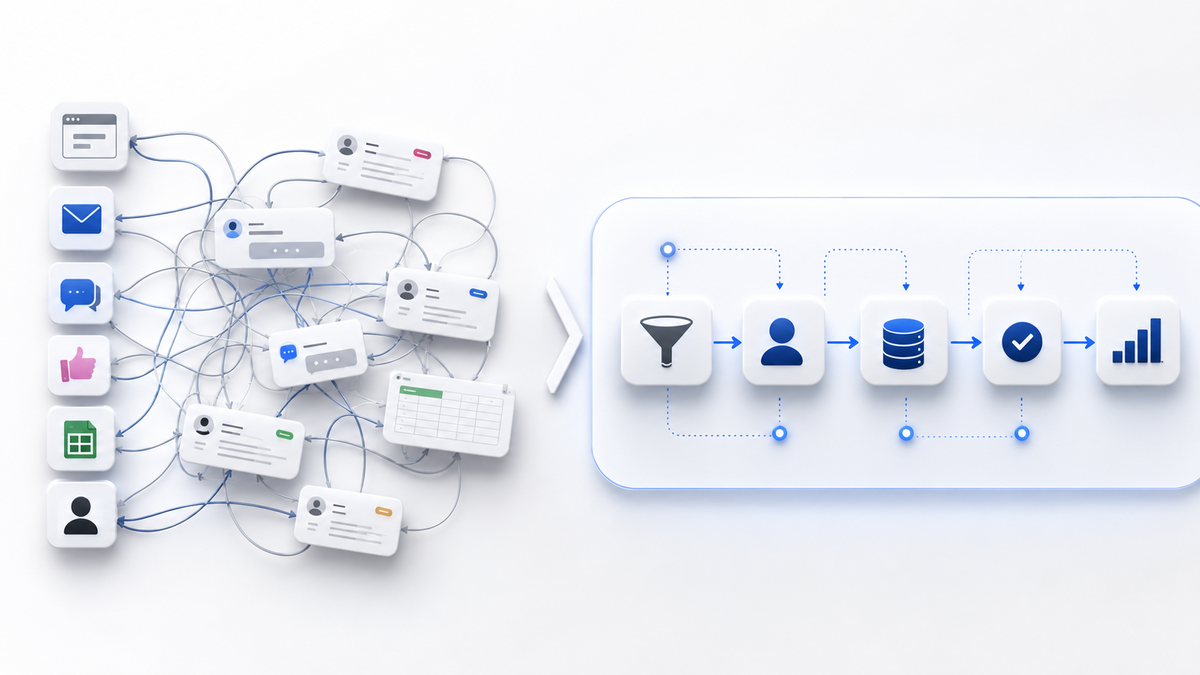
A potential customer visits your website. They fill out a contact form. The message lands somewhere. Someone should review it. Someone should reply. The lead should be categorized. The next action should be clear. The source should be tracked. The outcome should be visible later.
That sounds simple.
In many businesses, it is not.
The form sends to a shared inbox nobody checks consistently. The sales team asks marketing where the lead came from. Marketing asks the website person whether tracking is working. The business owner asks why nobody replied. Someone says they thought someone else handled it. The CRM has partial data. The lead source is unclear. The follow-up depends on whoever happened to see the email first.
Now add AI to that.
You can summarize the inquiry. You can classify it. You can draft a reply. You can maybe send it into a CRM. You can notify a team member.
But if nobody has defined the owner, the rules, the data, the escalation path, and the desired outcome, you have not created a better workflow. You have automated confusion.
That is why the useful question is not:
"Which AI tool should we use?"
It is:
"Which bottleneck do we understand well enough to improve safely?"
The Tool Is Not the Strategy
There is a reason AI tools are attractive.
They promise movement.
For a business owner, movement is tempting. There are emails to answer, products to update, ads to manage, customer questions to handle, reports to read, invoices to check, suppliers to chase, and competitors making noise.
So when a tool says it can save time, the instinct is obvious:
"Good. Let us add it."
But a tool is not a strategy.
A chatbot is not customer service strategy.
An AI writing assistant is not content strategy.
An automation platform is not operations strategy.
A reporting tool is not measurement strategy.
These tools can support the strategy. They cannot invent it for the business.
If your customer service policy is unclear, an AI assistant will inherit that uncertainty. If your product information is unreliable, AI will produce polished unreliability. If your content has no point of view, AI can make more content, but it will not make the business memorable. If your reporting is built on broken tracking, AI can explain the numbers beautifully while the numbers are still wrong.
This is why AI should come after the workflow audit, not before it.
Not because AI is bad.
Because AI is powerful.
Powerful tools deserve clean inputs, clear boundaries, and responsible owners.
Start With The Boring Map
Before buying another AI tool, map the workflow it is supposed to improve.
Not in a theoretical way. Not as a 40-slide internal document that nobody reads.
Map it in plain language.
What starts the workflow?
Who owns the first action?
What information is required?
Where does that information live?
What decision has to be made?
What happens next?
What should never be automated?
What should be reviewed by a person?
What should be measured at the end?
These questions are not exciting. They do not make good conference slides. They do not feel like "innovation".
But they separate useful AI from expensive decoration.
For example, an ecommerce business may want AI to help with product descriptions. That can be useful. But first, the business needs to know whether the product data is accurate. Are titles consistent? Are specifications complete? Are categories clean? Are supplier descriptions duplicated? Are sizes, colors, compatibility fields, images, and stock information structured properly?
If the product data is a mess, AI can generate text faster. But it may also generate inconsistent, misleading, or low-trust content faster.
The workflow question comes first:
Where does product information come from?
Who approves it?
What fields matter for buyers?
What must remain factual?
What can be rewritten for clarity?
What needs human review?
Once that is clear, AI can help.
Without that clarity, the business is mostly creating content debt at higher speed.
Website, Data, CRM, Ads, Follow-Up: They Are One System
Businesses often discuss digital tools as separate boxes.
The website is one thing. Ads are another. CRM is another. Email is another. Social media is another. AI is another.
Customers do not experience it that way.
A customer sees one business.
They click an ad. They land on a page. They read. They compare. They ask a question. They fill a form. They wait for a reply. They receive an email. They speak to someone. They decide whether the business feels serious.
If those pieces do not connect, AI cannot hide the gaps for long.
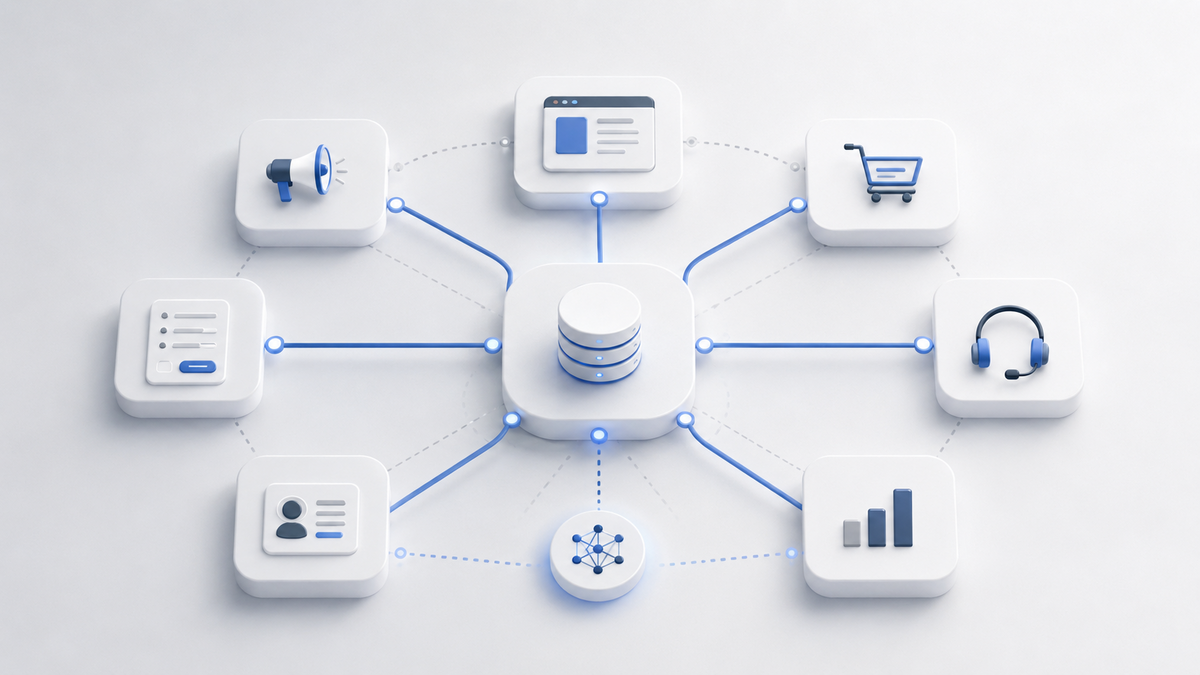
This is especially important for small and medium businesses, ecommerce shops, and local businesses. They often do not need "more technology" first. They need the existing technology to finally behave like one system.
The website should collect the right information.
Forms should send data to the right place.
Tracking should show which channels create useful inquiries.
The CRM should reflect reality, not wishful thinking.
Follow-up should have ownership.
Permissions should be clear.
Reports should answer business questions, not just display numbers.
Only then does AI become genuinely useful.
Because then AI can support a system that already has shape.
The Best AI Use Cases Are Usually Specific
The weakest AI plans are vague.
"We need AI."
"We should automate."
"Can we add a chatbot?"
"Can AI run our marketing?"
These questions are too broad to be useful.
Strong AI use cases are specific.
"Can AI summarize inbound requests before a person reviews them?"
"Can AI detect missing product data before publishing?"
"Can AI route leads based on category, location, budget, or urgency?"
"Can AI draft a first reply that a human approves?"
"Can AI compare support questions and show which issues keep repeating?"
"Can AI help the team produce a weekly internal report from clean data?"
These are better questions because they connect the tool to a workflow.
They also create boundaries.
AI can summarize, route, draft, detect, enrich, compare, warn, and assist.
In many businesses, that is already enough to create real value.
It does not need to "replace the team". It does not need to pretend to be a senior employee. It does not need to make every decision.
It can remove friction from a specific part of the process.
That is where practical businesses should start.
What You Should Fix Before AI
Before adding AI, look at the basics.
First, fix the input.
If the website form asks the wrong questions, AI receives weak information. If ecommerce product fields are inconsistent, AI receives messy data. If support requests come in without category, priority, or customer context, AI has to guess.
Second, fix ownership.
Every workflow needs a clear owner. If AI produces a summary, who checks it? If AI drafts a reply, who approves it? If AI flags a problem, who acts? If AI makes a mistake, who catches it?
Third, fix permissions.
Not every tool should access every piece of data. Customer information, internal notes, pricing, supplier details, and business documents need boundaries. Useful AI implementation is not just about convenience. It is also about control.
Fourth, fix measurement.
What does success look like? Faster replies? Fewer missed leads? Cleaner product pages? Better support triage? Less repetitive admin work? More accurate reporting?
If the business cannot define success, it will not know whether the AI tool helped or just created activity.
Fifth, fix the handoff.
Many workflows fail at handoff points. Marketing to sales. Website to CRM. Support to operations. Ecommerce to warehouse. Ads to landing page. Inquiry to quote. Quote to follow-up.
AI can help with handoffs, but only after the handoff is defined.
The Risk Is Not Only Bad Output
When people discuss AI risk, they often focus on wrong answers.
That matters.
But for businesses, there is another risk: invisible operational mess.
An AI tool can make a broken process look more professional on the surface.
The reply sounds polished. The report looks clean. The dashboard has charts. The product descriptions are longer. The chatbot answers quickly.
But underneath, the source data may still be weak, the responsibilities may still be unclear, and the customer experience may still be inconsistent.
That kind of failure is dangerous because it can feel like progress.
The business becomes busier. More things are generated. More notifications happen. More dashboards exist. More automation runs.
But the real question remains:
Did the customer experience improve?
Did the team save time in a measurable way?
Did fewer leads get lost?
Did decision-making become clearer?
Did the business reduce manual errors?
Did the website and CRM become more reliable?
If not, AI may simply be adding another layer to the problem.

A Practical AI Readiness Checklist
Here is a simple way to think about AI readiness before buying the next subscription.
Can you describe the workflow in one paragraph?
If not, do not automate it yet.
Can you identify the trigger?
Every workflow starts somewhere: a form submission, an order, a support ticket, a new product, an abandoned cart, a quote request, a review, a payment issue, a supplier update.
Can you identify the owner?
Someone has to be responsible. AI can assist, but ownership still belongs to the business.
Can you identify the data source?
Where does the information come from? Website? CRM? ERP? spreadsheet? email? ecommerce platform? ad platform? support inbox?
Can you define the decision?
Does the workflow require classification, prioritization, approval, routing, reply drafting, reporting, enrichment, or exception handling?
Can you define the boundary?
What should AI do, and what should it not do?
Can you measure the result?
If you cannot measure whether the workflow improved, the tool may become another monthly cost with a nice demo and no real business impact.
This checklist is not glamorous. That is the point.
Real implementation is rarely glamorous from the inside.
It is clear, careful, and practical.
Where AI Can Actually Help
Once the workflow is clear, AI can be very useful.
For customer inquiries, AI can summarize the message, detect intent, identify missing details, and suggest the next action.
For ecommerce, AI can help rewrite product descriptions, normalize categories, detect missing attributes, generate internal product notes, and support comparison content.
For marketing, AI can help turn one strong idea into multiple platform-native drafts, but it still needs a point of view, audience, and approval process.
For reporting, AI can help summarize data, explain changes, identify anomalies, and prepare internal notes, as long as the underlying tracking is clean.
For operations, AI can help standardize repetitive admin tasks, create checklists, prepare summaries, and reduce manual copy-paste work.
For support, AI can classify recurring questions, draft responses, and help the team see which issues need a better page, better product information, or better internal process.
These are practical uses.
They do not require hype.
They require discipline.
The Businesses That Win With AI Will Look Boring First
The businesses that win with AI will not always be the ones making the loudest announcements.
They will often be the ones doing boring work well.
They will know how leads move through the business.
They will know what data matters.
They will know which parts of the workflow need human judgment.
They will know where automation saves time and where it creates risk.
They will know how the website, forms, CRM, ads, ecommerce platform, and follow-up process connect.
Then, when they add AI, it will have somewhere useful to live.
That is the difference between buying a tool and building capability.
Anyone can buy the tool.
Not everyone can make it useful.

Conclusion
Before you buy another AI tool, fix the workflow it is supposed to help.
This does not mean avoiding AI.
It means respecting it enough to use it properly.
Start with the boring map. Look at the website. Look at the forms. Look at the data. Look at the CRM. Look at the permissions. Look at the handoffs. Look at the follow-up. Look at what the business actually does when a customer takes action.
Then decide where AI belongs.
Maybe it should summarize. Maybe it should route. Maybe it should draft. Maybe it should detect missing information. Maybe it should compare data. Maybe it should support reporting. Maybe it should stay out of certain decisions completely.
That is the real work.
AI does not save a broken process.
It makes the truth visible faster.
And for many businesses, that truth is the best place to start.